Chrome Extension · v1.2.0

Your Codeforces Training, Measured Automatically.

A local-first browser extension that starts timing the moment you open a problem, pauses automatically after 5 minutes of inactivity, and injects rich analytics directly into Codeforces profiles — no setup, no accounts required.
Privacy FirstLocal StorageVS Code IntegrationOpen Source
codeforces.com/profile/tourist/analytics
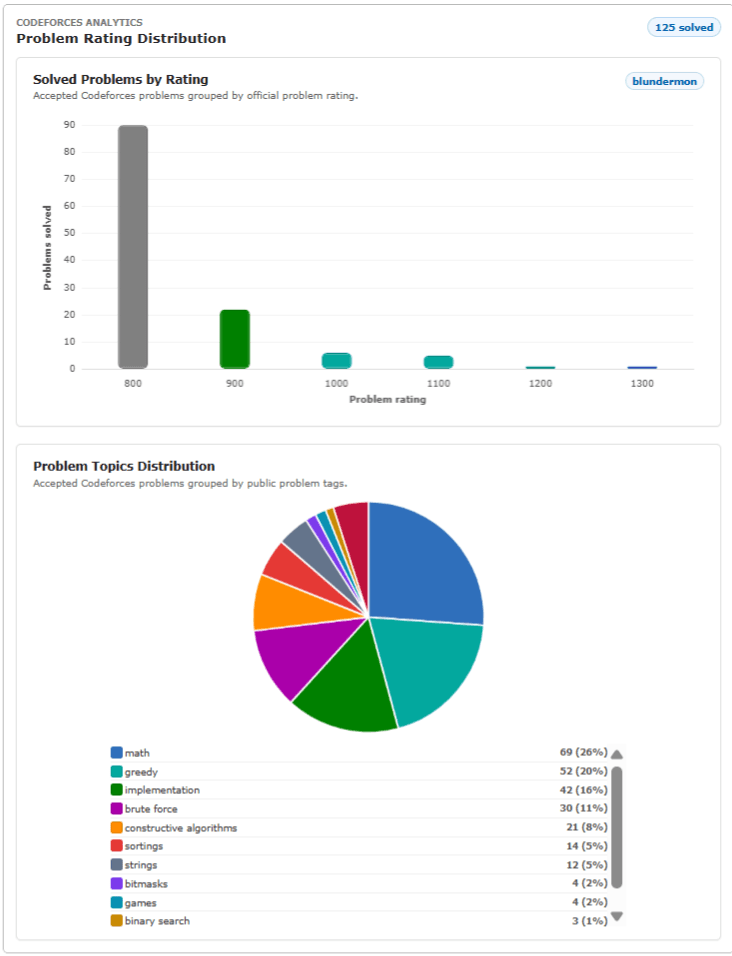
Codeforces Analytics Dashboard
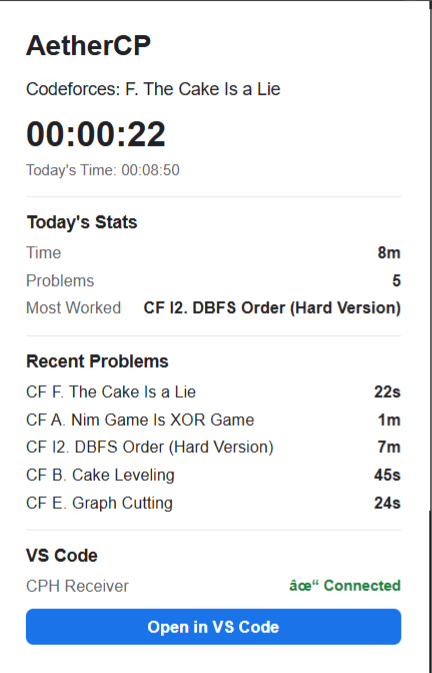
AetherCP Extension Popup Preview

Designed for the platforms you compete on

CODEFORCES
VS CODE
GITHUB
Why AetherCP

Engineered for competitive coders

Automatic timing, honest idle detection, and rich profile analytics — built for the way competitive programmers actually work.

Absolute Data Privacy

Built on a local-first philosophy. Your training metrics, problem records, and session history reside strictly on your device. No backend means we are structurally unable to collect your data.

Built for Competitive Coders

Traditional timers inflate solve times with breaks and paper-solving. AetherCP's 5-minute idle detector tracks only genuine focused coding time, pausing retroactively when you step away.

Zero Network Latency

Every aggregation, calculation, and chart renders locally inside your browser. No server roundtrips means instant popup load times and analytics that work completely offline.

Completely Unintrusive

Runs silently as a Manifest V3 service worker. Auto-tracking begins only when you open a supported Codeforces problem page. Nothing else changes about your workflow.

Resilient Session Management

Handles tab switches, browser restarts, and midnight crossings gracefully. Sessions that cross IST midnight are split into two daily buckets automatically.

Audit-Ready Open Source

Every routine, selector, and integration script is public on GitHub under the MIT license. Review the code, submit pull requests, or verify every privacy claim directly.

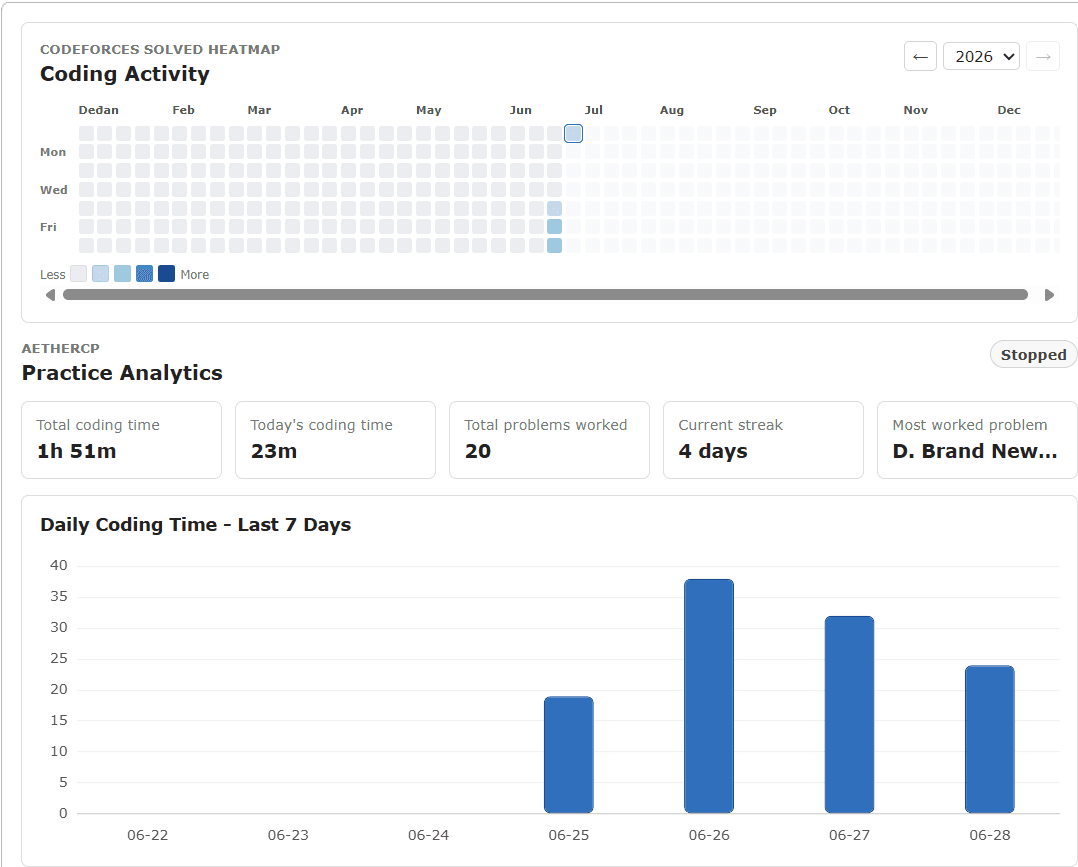
Practice Analytics

Capture training diagnostics locally

Log and aggregate active solve times per problem, per day, and per week. Track your preparation routines with data compiled entirely on your local machine.

  • View a full-year coding heatmap with 5 intensity levels and hover tooltips on your own profile
  • Track daily and weekly practice with a 7-day bar chart showing minutes per day
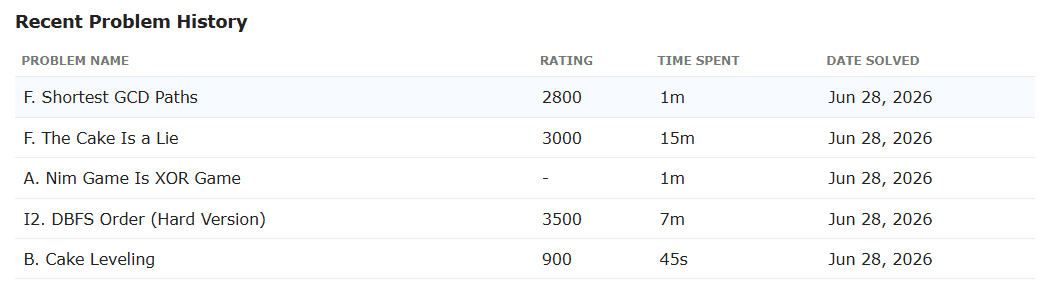
  • See all-time problem history with per-problem time, rating, and last-seen date
  • Monitor your current practice streak — consecutive days with any tracked coding time
  • View overview cards for total coding time, today's time, problems worked, and most-worked problem
  • All metrics compiled and rendered locally — no network roundtrips, no uploads

Personal practice analytics appear exclusively on your own Codeforces profile — refreshing every 10 seconds with live session data from your local storage.
codeforces.com/problemset
AetherCP Analytics Screenshot
codeforces.com/profile/tourist
AetherCP History Screenshot
codeforces.com/profile/tourist
Codeforces Profile Analytics Screenshot
Codeforces Analytics

Profile analytics on any Codeforces profile

AetherCP injects a rating distribution chart and topic breakdown directly into any Codeforces profile page — sourced from the public API, rendered client-side.

  • Rating distribution bar chart — color-coded by Codeforces difficulty tier (800 through 3500)
  • Topic pie chart — top 10 problem tags from all solved submissions, with counts and percentages
  • Solved count badge — deduplicated total of unique accepted problems
  • Works on any Codeforces profile — not just your own
  • Fetches up to 200,000 submissions from the public Codeforces API
  • Renders entirely client-side — no external servers, no data uploaded

Analytics appear automatically on any visited Codeforces profile — no configuration needed. Data is fetched read-only from the public Codeforces API and never uploaded anywhere.

How It Works

From install to insight in minutes

AetherCP requires zero configuration. Install, open a problem, and everything else happens automatically.

1

Load the Extension

Install from GitHub Releases or load unpacked source in Developer Mode. No logins, no accounts, no tokens required.

2

Open a Codeforces Problem

Navigate to any problem on /problemset/, /contest/, or /gym/. The content script detects the platform and problem name automatically.

3

Timer Starts Automatically

A session begins in the background service worker. Idle detection monitors your activity. Refresh the page and the timer keeps counting — no restart.

4

Sessions Saved Locally

When you close the tab or switch away, the session is finalized and written to chrome.storage.local. Everything stays on your device.

5

View Your Analytics

Open the popup for a live timer and today's stats. Visit your Codeforces profile to see your full-year heatmap, 7-day chart, and problem history.

6

Understand Your Weak Areas

Use the topic pie chart to see which problem tags you solve most. Use time-per-problem data to identify where you spend the most effort.

Key Features

Everything you need to track your practice

All features run entirely inside your browser. No accounts, no cloud, no configuration required.

Active

Automatic Problem Tracking

Opens a problem page on Codeforces and the timer starts automatically. No buttons, no setup — session tracking begins the moment you load a problem.
Smart

Smart Idle Detection

Pauses the timer after 5 minutes of inactivity, then retroactively corrects the session end time to when you actually stopped — not when the check fired.

Daily Practice Analytics

Real-time summary of today's total time, distinct problems worked, and most-worked problem. Resets at IST midnight every day.
Visual

Full-Year Coding Heatmap

GitHub-style contribution grid injected into your own Codeforces profile. Color intensity maps to minutes coded. Includes year navigation and hover tooltips.

Competitive Profile Analytics

Injects a rating distribution bar chart and topic pie chart into any Codeforces profile — not just your own — sourced from the public Codeforces API.

Recent Problems List

Up to 5 most recently worked problems with total accumulated time, shown live in the extension popup. Time updates every second.
CPH

VS Code Integration

One click sends the current Codeforces problem — name, URL, all sample test cases, time limit, and memory limit — to VS Code via the Competitive Companion protocol.

Local-First Storage

All session data, problem history, and daily totals live entirely in chrome.storage.local. Nothing ever leaves your browser.

Optimize your training today.

MIT Licensed. Open-source. Zero telemetry configurations. Load unpacked source locally in seconds.

MIT License · Chrome Web Store · v1.2.0